
The Google Workspace CMMC Challenge: A Contractor's Guide to Compliance
As the evening glow settles over Silicon Valley, another IT manager in the Defense Industrial Base (DIB) is asking a critical question: “We’re a Google shop. Can we actually achieve CMMC compliance?”
While the DIB landscape is heavily populated with Microsoft solutions, many modern, agile companies have built their collaborative infrastructure on Google Workspace. The platform is powerful, user-friendly, and born in the cloud. But when it comes to the stringent demands of the DoD’s Cybersecurity Maturity Model Certification (CMMC), the path is far less defined.
Achieving CMMC compliance with Google Workspace is not impossible, but it is a complex challenge that requires careful planning, a deep understanding of the regulatory landscape, and a proactive partnership with Google. Here’s what you need to know.
The Foundational Hurdle: DFARS, ITAR, and Data Sovereignty
Before you can even begin mapping security controls, you must address the elephant in the room: meeting the overarching federal requirements that come with handling Controlled Unclassified Information (CUI). The key clause is DFARS 252.204-7012, which mandates, among other things, specific incident reporting capabilities and a cloud environment that is, at a minimum, FedRAMP Moderate equivalent.
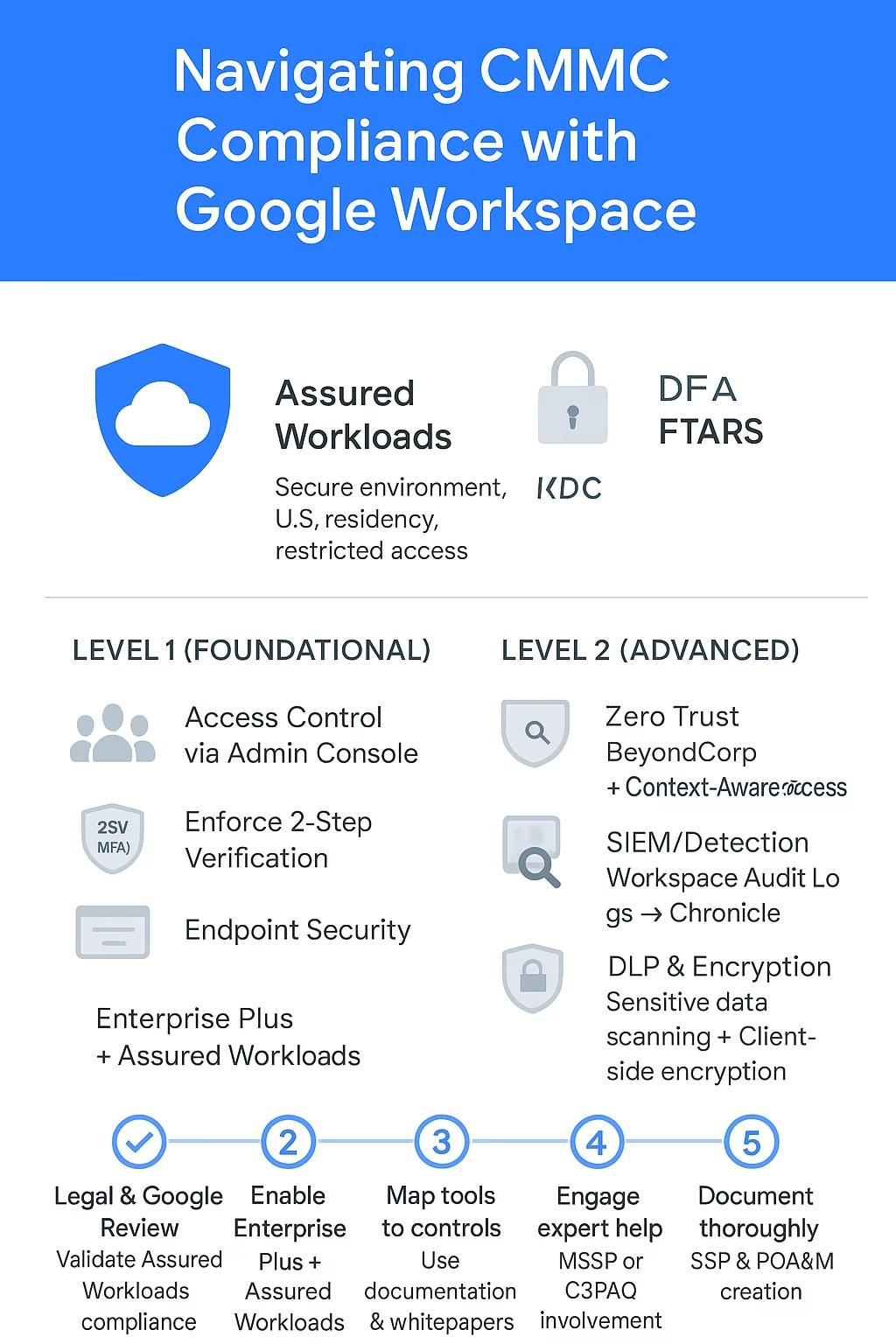
For this, Google’s solution is Assured Workloads. This is not a separate cloud, but rather an infrastructure service that creates controlled environments within Google Cloud. It allows organizations to enforce U.S. data residency and personnel access restrictions (i.e., ensure only U.S. persons can access support and data), which are critical for meeting ITAR and CUI handling requirements.
This is the most critical step: Before proceeding, you must work directly with your Google representatives and legal counsel to get explicit confirmation that your specific configuration of Google Workspace with Assured Workloads will satisfy all DFARS 7012 requirements, especially the flow-down clauses for incident response and forensic analysis. This is a due diligence step you cannot skip.
Mapping Google Workspace Tools to CMMC Controls
Assuming you have established a compliant foundation with Assured Workloads, you can then leverage Google’s suite of tools to meet the specific CMMC practices.
For CMMC Level 1 (Foundational)
Level 1 is achievable with standard Google Workspace Business Plus or Enterprise editions. The 15 basic controls for protecting Federal Contract Information (FCI) can be met with core Workspace features:
Access Control: Use the Google Admin console to manage user accounts, groups, and basic access permissions to Drive and Shared Drives.
Identification & Authentication: Enforce 2-Step Verification (MFA) for all users, a fundamental security practice.
System Integrity: Manage ChromeOS devices (which have built-in security like Verified Boot) or use Google Endpoint Management to enforce basic policies on other devices.
For CMMC Level 2 (Advanced)
For handling CUI, you’ll need Google Workspace Enterprise Plus deployed within an Assured Workloads environment. This unlocks the advanced security features needed to address the 110 controls of NIST SP 800-171.
Access Control & Zero Trust: Google’s BeyondCorp Enterprise is the flagship solution for implementing a Zero Trust security model. Combined with Context-Aware Access, you can create granular policies that govern access to data based on user identity, location, device security status, and more.
Audit and Accountability: The Workspace Audit Log tracks user and admin activity, which can be exported to Google Chronicle Security Operations. Chronicle acts as your SIEM/SOAR platform, allowing for advanced threat detection, log analysis, and investigation across your entire environment.
Data Protection and Encryption: Data Loss Prevention (DLP) policies can automatically scan Google Drive and outgoing emails for CUI identifiers to prevent exfiltration. For the highest level of control, Client-side encryption for Google Drive and Gmail allows your organization to hold the sole encryption keys, meaning Google cannot access the content under any circumstances.
Endpoint Security: Google Endpoint Management allows you to enforce strong device policies, such as requiring screen locks, disk encryption, and approved OS versions on Windows, macOS, and mobile devices.
A Realistic Strategy for the Google-Powered Contractor
The road to CMMC with Google Workspace is one that requires expert navigation.
Start with Legal and Google: Your first calls should be to your legal team and your Google account executive. Validate the DFARS/ITAR compliance posture of Assured Workloads for your specific use case. Get it in writing.
Go All-In on Enterprise Plus & Assured Workloads: This is non-negotiable for CUI. You need the advanced security features and the controlled environment this combination provides.
Leverage Google’s Documentation: Google provides whitepapers and guidance on CMMC, including a detailed control mapping for NIST SP 800-171. Use these documents as your guide.
Partner with an Expert: This is not a DIY project. Engage with a Managed Security Service Provider (MSSP) or a C3PAO that has specific, demonstrable experience in implementing CMMC controls on the Google Workspace platform. Their expertise will be invaluable.
Document Rigorously: Create and maintain a detailed System Security Plan (SSP) and Plan of Action & Milestones (POA&M) that clearly explains how your specific configurations of Google’s tools meet every single CMMC requirement.
The Verdict
Can you achieve CMMC compliance using Google Workspace? The answer is a qualified yes. While it lacks a purpose-built, all-in-one solution like Microsoft’s GCC High, a properly configured environment using Google Workspace Enterprise Plus within Assured Workloads can provide the technical controls to meet the standard.
However, this path demands a higher level of due diligence from the contractor. You are taking on more responsibility to verify regulatory compliance and architect a secure solution. For organizations deeply committed to the collaborative power of Google Workspace, the path exists, but it must be walked with caution, expertise, and precision.